










Candy Wrapper - Platformer Game | Play Online for Free
Master the loop in Candy Wrapper, a retro-inspired arcade platformer. Use screen-wrapping mechanics to outsmart enemies and clear levels in this fast-paced tribute to classic gaming.
Sweet Chaos: A Deep Dive into Candy Wrapper
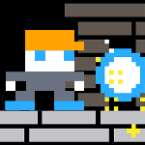
If you grew up clutching a plastic controller in a dimly lit arcade, Candy Wrapper is going to feel like a warm, sugary hug. It’s a tight, single-screen "looping" platformer that takes the DNA of classics like Bubble Bobble or Mappy and gives it a modern, candy-coated polish. It’s fast, deceptively simple, and carries that "just one more round" energy that makes arcade games so addictive.
Game Intro: The Screen-Wrap Hook
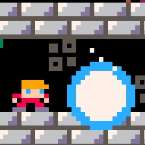
The core of Candy Wrapper lies in its name—the "wrapping" mechanic. The stage isn’t bound by the edges of your monitor. If you walk off the left side of the screen, you pop out on the right. If you drop through a hole in the floor, you’ll fall back down from the ceiling.
This creates a chaotic, 360-degree battlefield where enemies can sneak up on you from literally anywhere. The art style is bright and poppy, but don't let the aesthetics fool you; the level design gets tricky fast, forcing you to use the screen-looping to outmaneuver mobs that would otherwise corner you.
How to Play: Bounce or Bust
The objective is straightforward: clear the screen of all enemies to progress to the next stage. Unlike combat-heavy platformers where you’re shooting projectiles, Candy Wrapper is all about verticality and timing.
- Defeating Enemies: You take out foes the old-fashioned way—by landing a solid jump right on their heads.
- The Looping Strategy: Because the screen wraps, you can often escape a tight spot by jumping "up" into the top of the screen to reappear at the bottom, or vice versa.
- Progressive Difficulty: As you clear levels, the platforms get more intricate and the enemies get faster, requiring you to master the physics of the "loop" to survive.
Controls: Play Your Way
One of the best things about this title is how accessible it is regardless of your setup. The movement feels snappy and responsive, which is vital when you're trying to time a pixel-perfect landing on a moving target.
- Keyboard (Traditional): Use the Arrow Keys to move and Spacebar to jump.
- Keyboard (Left/Right Handed): Full support for WASD or IJKL layouts.
- Gamepad: It features native Gamepad Support, which is honestly the superior way to play if you want that genuine retro console feel.