












Typefarmer - Typing Game | Play Online for Free
Test your typing speed and accuracy in Typefarmer, a fast-paced arcade game where words harvest crops. Master the multiplier system to climb the global leaderboards!
If you’re looking for a way to sharpen your keyboard skills without staring at a dry typing tutor, Typefarmer is a clever little pivot. It takes the frantic energy of an arcade "lane-defense" game and swaps out the weapons for your home row keys. Instead of just mindlessly hitting letters, you’re managing a literal harvest.
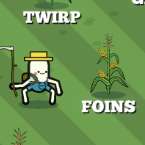
The game throws various crops at you, each tethered to a specific word. Your job is to clear them before they disappear, but it’s not just about raw words-per-minute. There’s a distinct rhythm to the gameplay; the multiplier system rewards those who can maintain a steady, error-free flow. It forces you to balance that "need for speed" with the discipline of not fat-fingering your way into a broken streak. It’s surprisingly addictive to see how long you can keep a perfect chain going while the screen starts to get crowded.
How to Play
The objective is straightforward: harvest your field by typing the words that appear under the ripening crops. As you successfully clear a plant, another takes its place, often with increasing complexity or speed.
What sets this apart from basic typing tests is the Strategic Multiplier. Every consecutive word you type correctly builds your score bonus. However, a single typo resets that progress. This creates a high-stakes environment where you have to decide between typing at your absolute limit or slowing down just enough to ensure every keystroke counts. To get a top spot on the global leaderboard, you’ll need to master the art of "controlled haste"—fast enough to clear the field, but precise enough to keep that multiplier climbing.
Controls
The controls are as minimalist as they get, allowing you to focus entirely on the screen:
- Keyboard (A-Z): Type the letters as they appear on the screen to harvest crops.
- Backspace: Use this to correct any typos before hitting the end of the word.
- Enter/Space: Generally not required, as the game recognizes the completion of a word automatically, keeping the pace fluid.