



Casual Crusade - Puzzle Game | Play Online for Free
Master the divine art of deck-building in Casual Crusade. A unique roguelike puzzle game where you lay tiles, pillage rewards, and spread your influence across ever-changing lands.
A Holy Path Through the Hexes
Casual Crusade isn't your typical "conquer the world" strategy game. It’s a clever blend of a roguelike deck-builder and a spatial puzzle that feels surprisingly zen, despite the theme of religious conquest and pillaging. Instead of managing massive armies, you’re managing a hand of tiles.
The core loop is simple but addictive: you’re trying to spread "the good word" across a procedurally generated map. You start with a basic set of tiles, but as you progress, you have to decide whether you want to focus on raw expansion or hunt for those rare blessing tiles that can turn a doomed run into a divine victory. It has that "just one more round" feel that defines the best indie deck-builders.
How to Play: Building Your Testimony
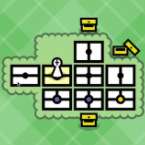
Your objective is to cover every inch of the map using the tiles in your deck. It’s a game of pathfinding and resource management where every placement matters.
- Laying Tiles: Each turn, you’ll draw from your deck to bridge the gap between lands. You can’t just throw them down anywhere; you need to be strategic about how you navigate the terrain to ensure you don’t bottle yourself in.
- Expansion vs. Loot: While the goal is to cover the land, you’ll see tempting rewards scattered across the map. Veering off your primary path to "pillage" these spots can net you new, more efficient tiles or permanent passive abilities (blessings).
- The Roguelike Edge: Because the maps and tile draws are randomized, you have to adapt your strategy on the fly. If you run out of tiles before the land is covered, your crusade ends. Success means knowing when to play it safe and when to gamble for a powerful artifact.
Controls: Simple Clicks for Complex Choices
The game keeps the interface clean so you can focus on the board state. It’s designed for easy pick-up-and-play sessions.
- Mouse/Touch: Click and drag tiles from your hand onto the board.
- Rotate Tiles: Most tiles can be rotated (usually with a Right-Click or a Spacebar tap) to fit the specific needs of the geography.
- Menu/Deck View: Click your deck pile to see what’s remaining, helping you calculate the odds of drawing that one specific straight-path tile you desperately need.